Data Visualization
Sections 2.7 - 2.9

Today’s goals


  1. Create a boxplot
  2. Create a barplot
  3. Properly describe a boxplot and barplot
  4. Display barplots in various ways by category

Artwork by @allison_horst

5NG#4: Boxplots

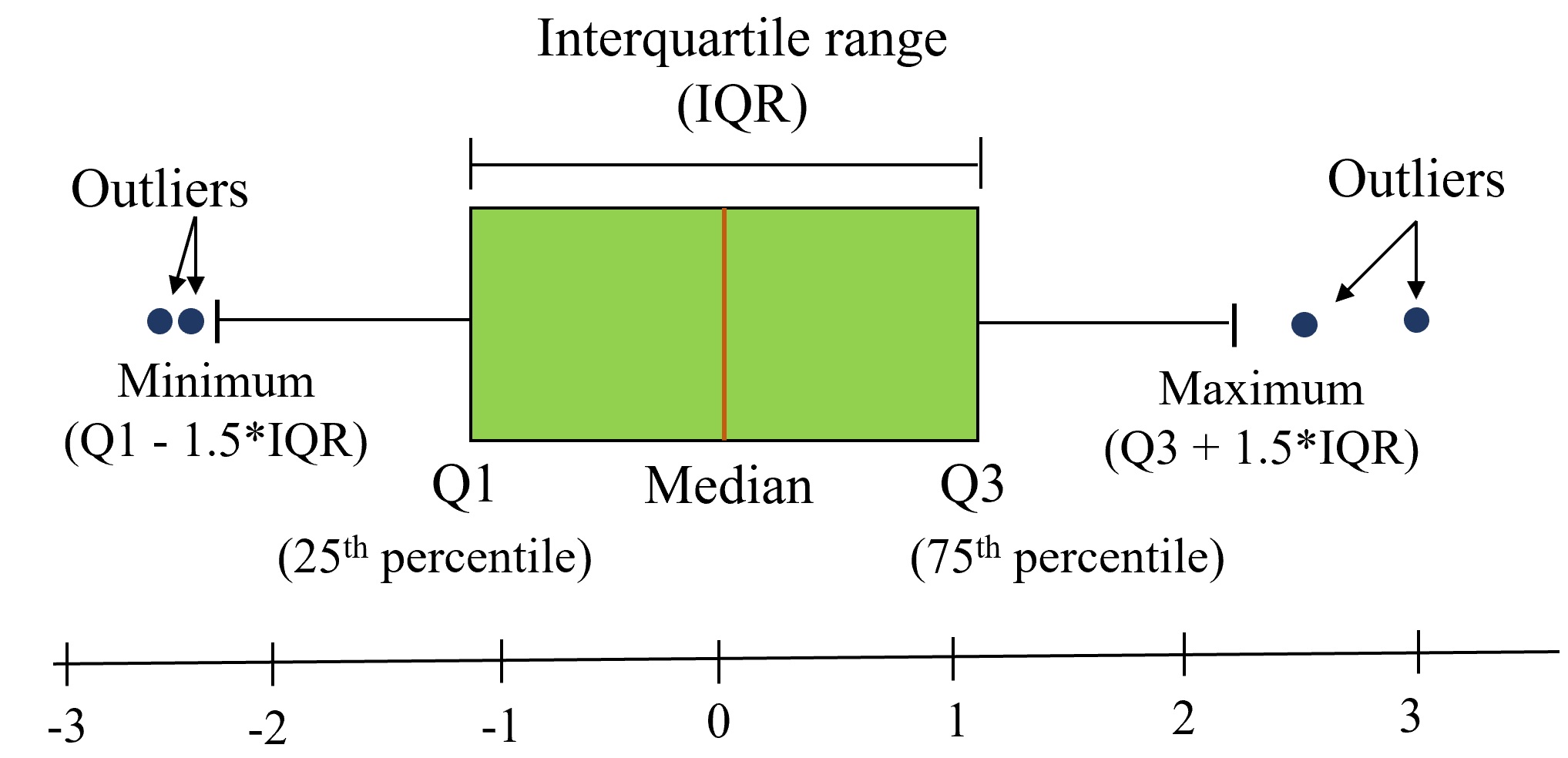
  • A boxplot is used to visualize the distribution of a single numerical variable.
  • Grouped boxplots are particularly useful for comparing the distribution of a numerical variable across a categorical variable. ie: shows the relationship between a numerical and a categorical variable.


Boxplot syntax in R:

ggplot(data= my_data, aes(x = (optional categorical variable),  y = var1)) +
  geom_boxplot()

If you switch x and y, it will just change the orientation of the boxplot (personal preference).

5NG#4: Boxplots

There are 3 things that we typically focus on and describe/compare when inspecting a boxplot:

  • center
  • spread
  • shape and outliers

Binary Variables

Consider the titanic dataset, which contains information about passengers on the titanic. If a passenger survived, then the variable Survived = 1.

titanic %>% 
  glimpse()
Rows: 32
Columns: 4
$ Class    <chr> "1st", "2nd", "3rd", "Crew", "1st", "2nd", "3rd", "Crew", "1s…
$ Sex      <chr> "Male", "Male", "Male", "Male", "Female", "Female", "Female",…
$ Age      <chr> "Child", "Child", "Child", "Child", "Child", "Child", "Child"…
$ Survived <dbl> 0, 0, 0, 0, 0, 0, 0, 0, 0, 0, 0, 0, 0, 0, 0, 0, 1, 1, 1, 1, 1…

Is Survived a categorical or numerical variable?

R will read in numerical columns as “numbers” even though these numbers are supposed to represent “categories”.

To fix this we need to use the factor() function.

Typing factor(Survived) would turn the variable into a “factor”.

5NG#5: Barplots

A barplot is used to visualize the distribution (frequencies) of a single categorical variable.

  • geom_bar() is used when we have the raw data and counting how many observations are in each category has to be done (list not yet counted).
  • geom_col() is used when we directly have counts of each category in our dataset (pre-counted).

Barplot syntax in R:

ggplot(data= my_data, aes(x = var1)) +
  geom_bar()

5NG#5: Barplots continued

When describing a barplot we look for…

  • Disparities in the height of the bars.
  • Bar with the most observations.
  • Bar with the least observations.
  • If all the bars are about equal height, then the distribution is uniform.

Example 1: Barplots

Consider the Palmer Penguins dataset.

library(palmerpenguins)
head(penguins)
# A tibble: 6 × 8
  species island    bill_length_mm bill_depth_mm flipper_length_mm body_mass_g
  <fct>   <fct>              <dbl>         <dbl>             <int>       <int>
1 Adelie  Torgersen           39.1          18.7               181        3750
2 Adelie  Torgersen           39.5          17.4               186        3800
3 Adelie  Torgersen           40.3          18                 195        3250
4 Adelie  Torgersen           NA            NA                  NA          NA
5 Adelie  Torgersen           36.7          19.3               193        3450
6 Adelie  Torgersen           39.3          20.6               190        3650
# ℹ 2 more variables: sex <fct>, year <int>

We are interested in plotting the distribution of species.

Are we using geom_bar() or geom_col()?


Example 2: Barplots

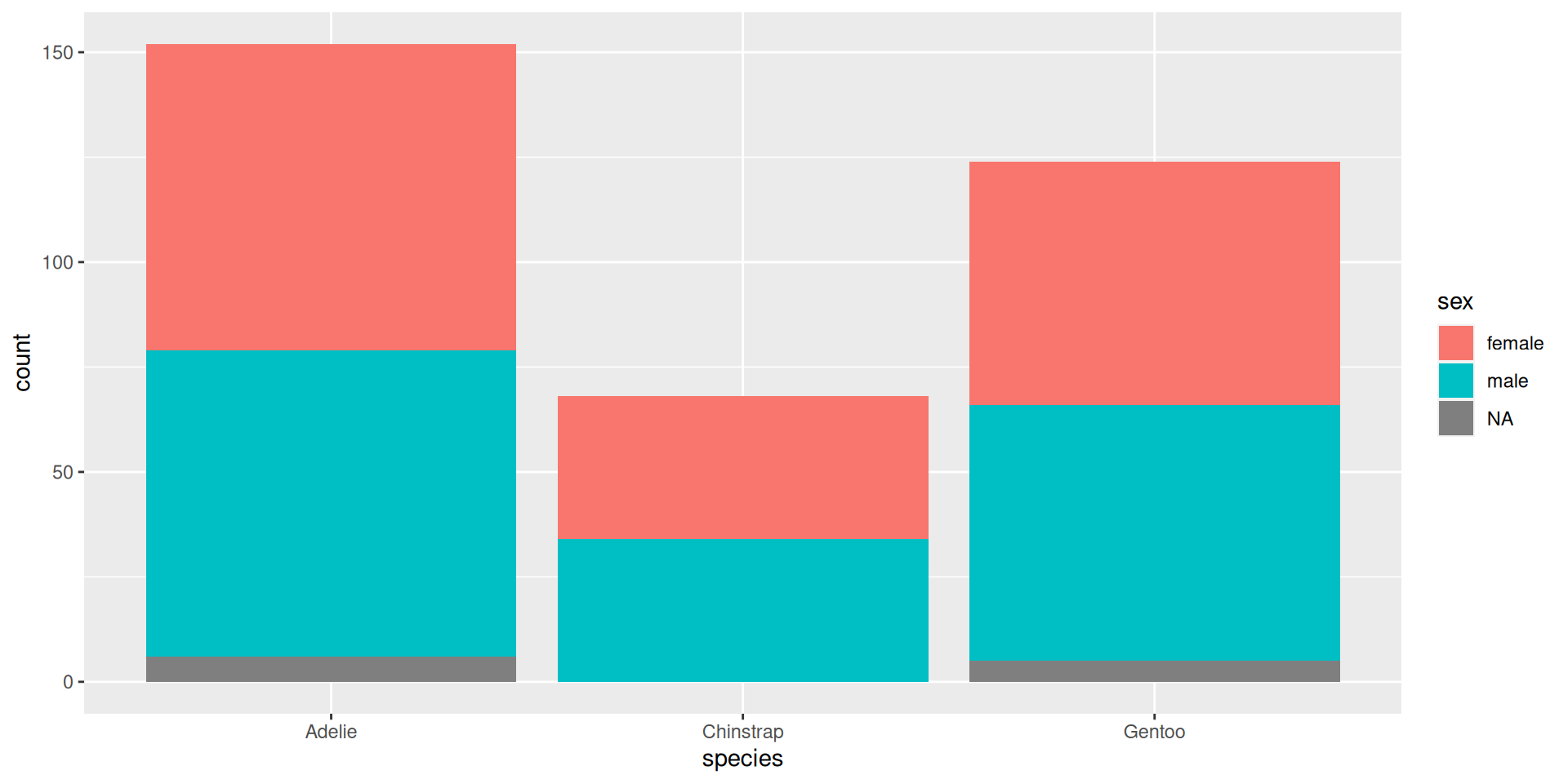
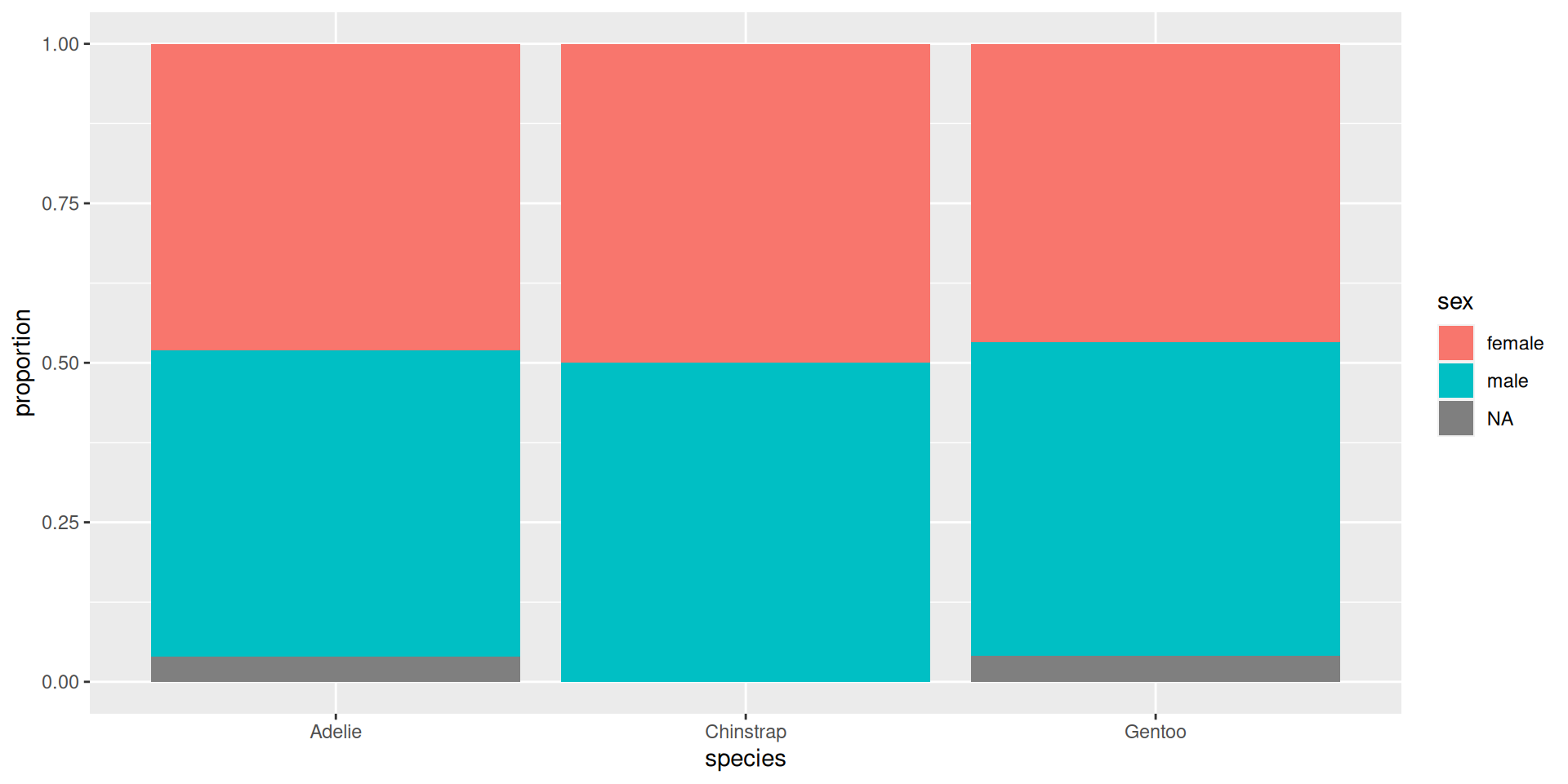
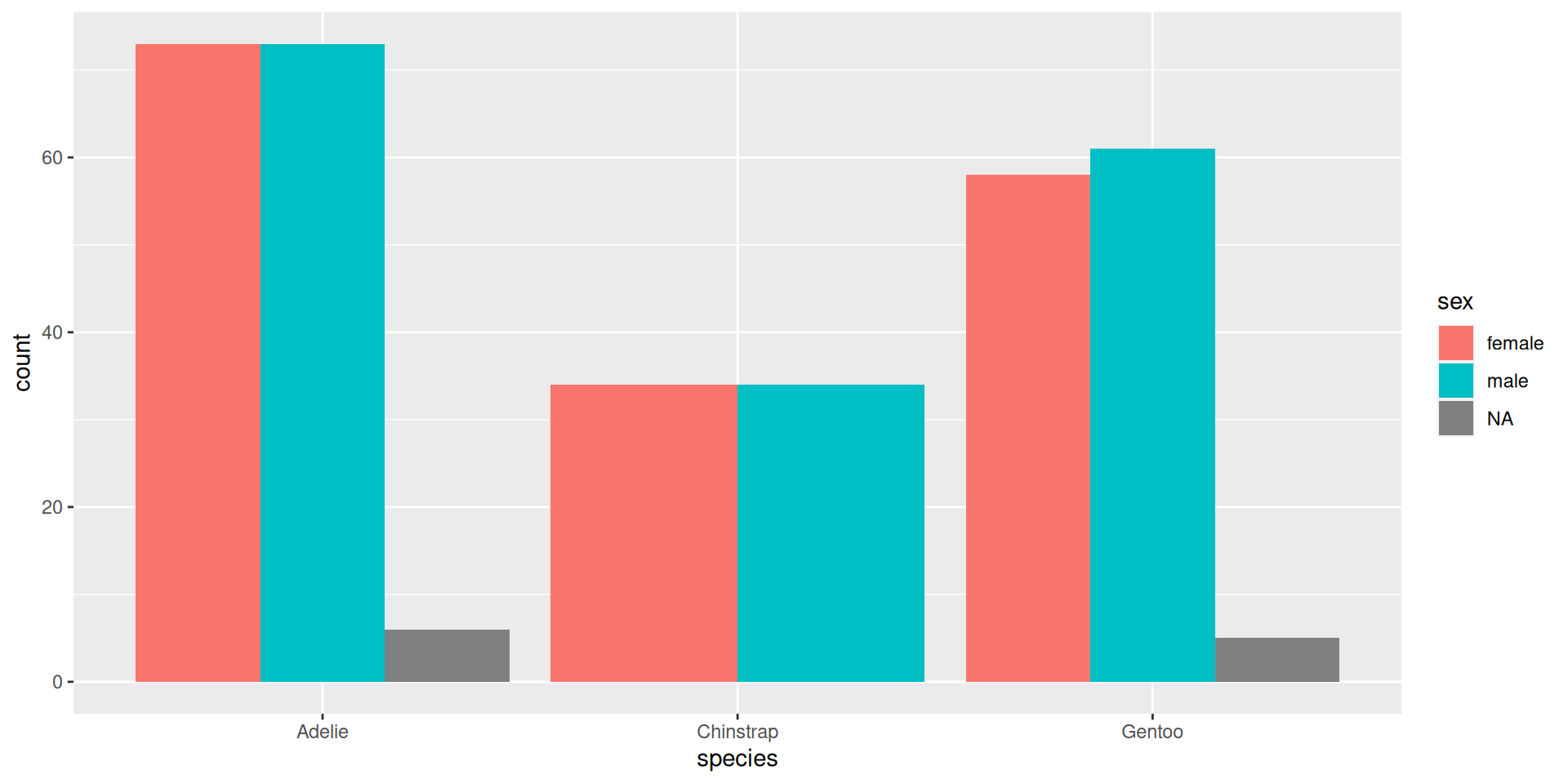
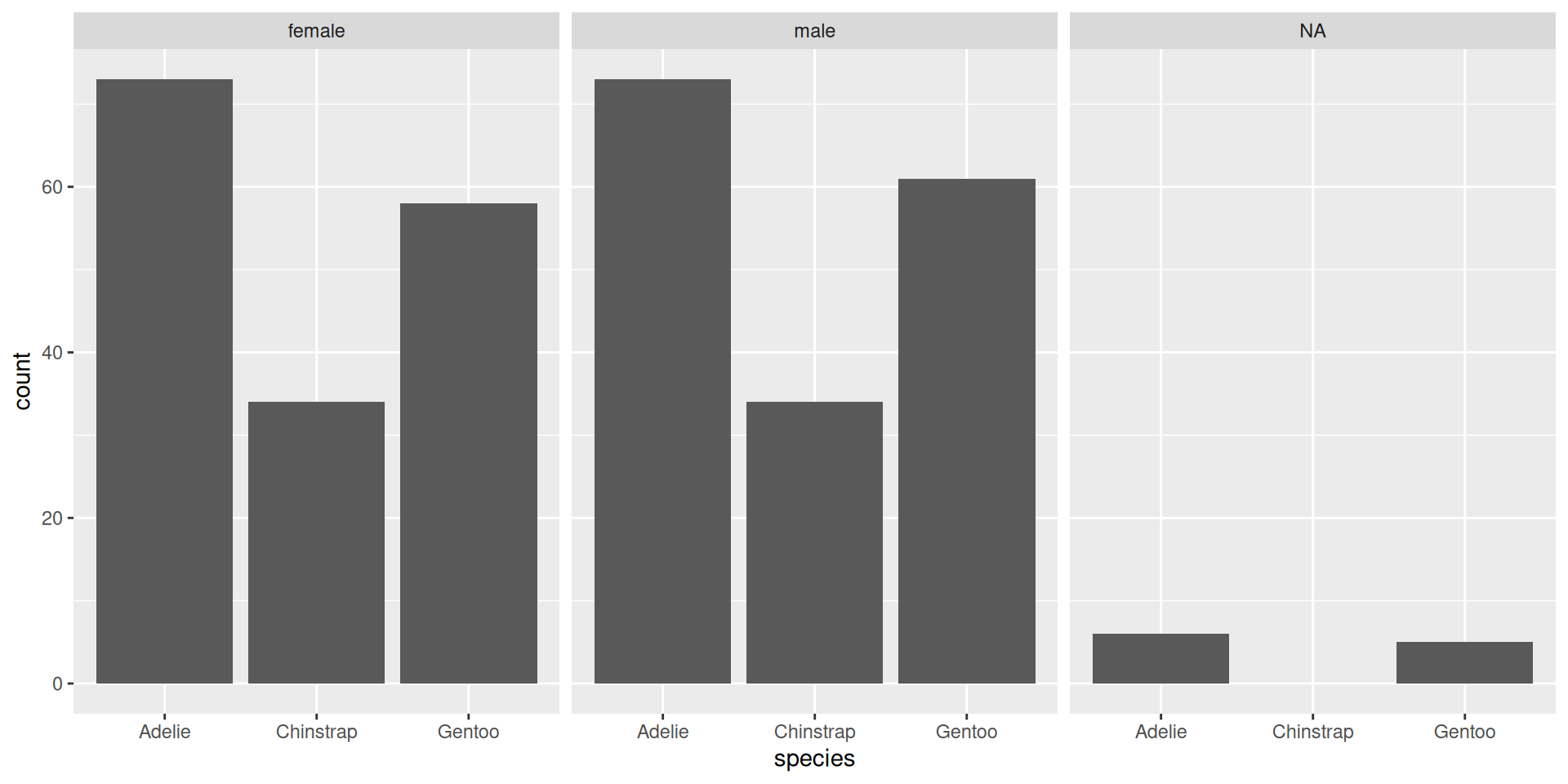
What if we want to visualize the distribution of sex in each of the species. There are 4 main ways to visualize multiple levels within a categorical data:

ggplot(data=penguins, aes(x = species, fill = sex)) +
  geom_bar()
ggplot(data=penguins, aes(x = species, fill = sex)) +
  geom_bar(position = "fill") +
  ylab("proportion")
ggplot(data=penguins, aes(x = species, fill = sex)) +
  geom_bar(position = "dodge")
ggplot(data=penguins, aes(x = species))+
  geom_bar() +
  facet_wrap(~ sex)

Extra information and resources

“factor” vs “character” variable

  • factor has predefined levels and the observation must be one of those levels (limited response options).
  • character can take on any string value (think open response options)
  • Factors in R